GitLab brings agentic software workflows to Slack
GitLab for Slack can now turn team conversations into structured software work through agentic capabilities, allowing users to create issues, merge requests and agent flows from Slack. The feature is in limited availability for GitLab.com users with GitLab 19.6.
- GitLab for Slack adds agentic capabilities in limited availability on GitLab.com.
- Users can mention @GitLab to turn Slack discussions into GitLab work.
- The integration supports public channels, private channels and direct messages.
- Requests follow users' GitLab permissions and create agent sessions in GitLab.
- General availability is planned with GitLab 19.7.
From Slack discussions to tracked work
Software decisions often begin in conversations involving product managers, engineers, designers, security teams, sales teams and customers. GitLab says its Slack integration is designed to handle the handoff from those discussions to the platform where work is planned, reviewed and delivered.
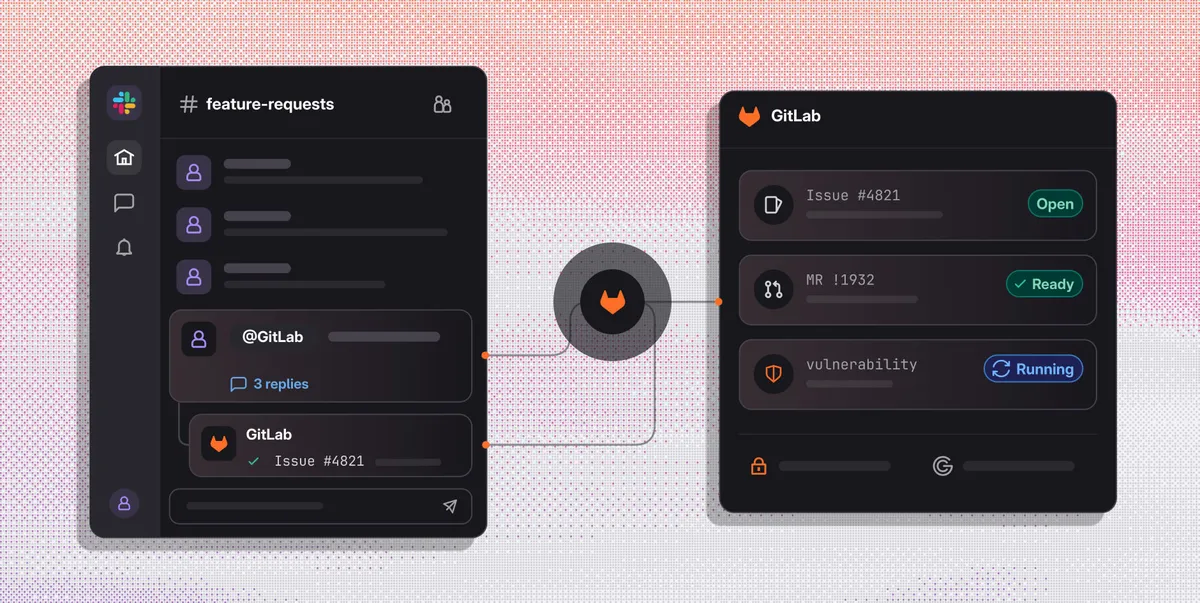
Users can mention @GitLab in a thread in their team's channels. The agent reads the surrounding messages in that channel, identifies existing work and turns decisions into tracked GitLab work. It can also start agent flows that carry work toward production, with results posted back to the Slack thread.
The integration works in both directions. Slack messages provide the input, while GitLab information, including what has been built, what is tracked and whether a merge request is ready, can appear in the conversation. Users can also ask the agent to summarize a channel before acting.
Public channels, private discussions and direct messages
GitLab for Slack works in public and private channels, where teams can bring decisions into a shared discussion and turn them into visible work. It also works in a user's own direct message, providing a private place to ask questions, check on a merge request or draft an issue before sharing it with colleagues.
GitLab presents the integration as a tool for everyone involved in shaping software, including people who do not write code. Product managers can scope work, designers can send notes to the teams and agents handling implementation, and sales and customer teams can follow a request from discussion to production. Engineers can check existing work before starting something again.
“Teams can go from a quick discussion to planned, reviewed, and shipped work without switching tools,” said Katie Steigman, Vice President Product Management, Slack.
Controls remain in GitLab
GitLab says the agent is designed to act only when requested. In channels, that requires a mention of @GitLab. In a user's own direct message, responses are visible only to that user. The integration runs only in internal conversations and does not operate in external Slack Connect channels.
Each request uses the requester's linked GitLab account and existing permissions. If a user cannot access a project in GitLab, the agent cannot access it through Slack. The agent reads surrounding context only from the channel where it was mentioned, and actions in GitLab continue to follow the user's permissions.
Each request creates an agent session in GitLab. Merge requests use the same reviews, approval rules and audit trail as other changes. Usage draws from GitLab Credits, allowing administrators to track and cap it. These controls mean Slack becomes another entry point to GitLab's software workflows, rather than a way around them.
Availability and next steps
GitLab for Slack is in limited availability on GitLab.com. Users who already have the GitLab for Slack app on GitLab.com can reinstall it to add the agent capabilities, with no new interaction method required beyond mentioning @GitLab.
General availability is planned with GitLab 19.7, including access for GitLab Self-Managed and GitLab Dedicated for Premium and Ultimate customers. Self-Managed users will need to upgrade to GitLab 19.7 when it is available and then reinstall the app.
GitLab is also asking users to help shape future development. Each agent response in Slack includes thumbs up and down buttons for feedback, so users can report what worked or did not work directly from the thread.
GitLab: Turn Slack conversations into trusted software, faster