LiveKit Agents can now join Zoom, Meet and Teams through Recall.ai
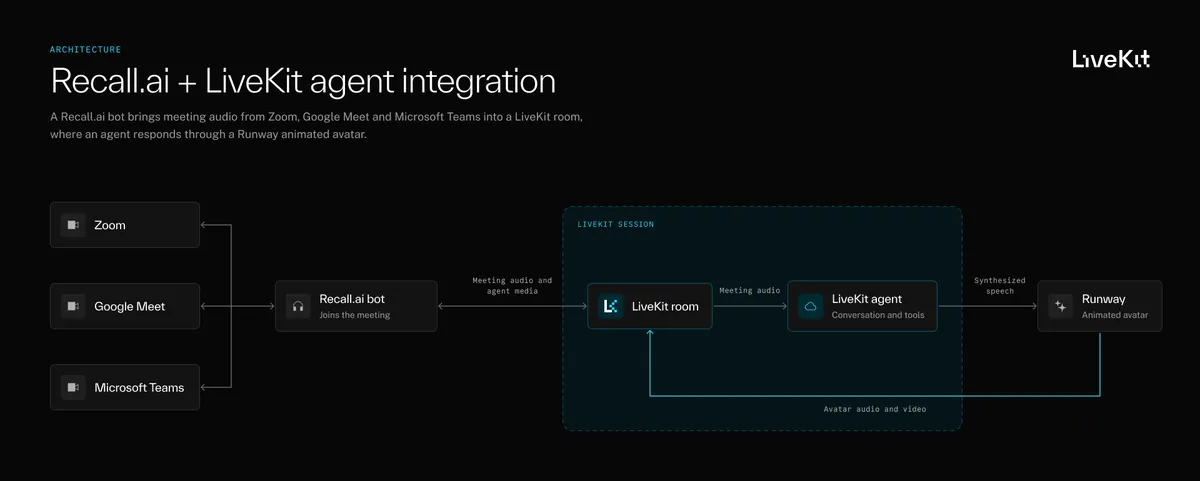
LiveKit has shown how developers can bring LiveKit Agents into Zoom, Google Meet and Microsoft Teams meetings through Recall.ai. The integration lets agents handle conversation in LiveKit while Recall.ai manages the meeting connection and related controls.
- Recall.ai connects LiveKit Agents to Zoom, Google Meet and Microsoft Teams.
- LiveKit handles conversation, speech processing, model inference and tool calls.
- The sample agent uses a Runway avatar and can share webpages and post chat messages.
- Participants can mute, unmute or tell the agent to leave.
- The demo code is available in the Recall.ai LiveKit demo repository.
Recall.ai connects meetings to LiveKit rooms
LiveKit Agents is designed for building voice and multimodal AI agents that can listen, respond and perform actions in real time. With the Recall.ai integration, an agent can join supported meeting platforms without developers having to create and maintain separate integrations for each one.
Recall.ai connects its bot to a meeting and sends the bot's audio and the agent's media to a LiveKit room. LiveKit then manages speech processing, model inference and tool calls. The sample application uses a LiveKit agent with a Runway avatar that joins Google Meet, answers questions, shares webpages, posts chat messages and responds to commands from participants.
The demonstration uses Google Meet, but the underlying integration also supports Zoom and Microsoft Teams. Its launcher is currently configured for Google Meet, so developers would need to make changes to handle the other platforms.
Agents can control meeting actions with function tools
The sample includes two processes: a LiveKit worker that runs the agent and a Python launcher that creates the Recall.ai bot. Developers configure the Recall.ai workspace with their LiveKit project credentials, then use the same agent name in the launcher and LiveKit worker.
LiveKit function tools allow the agent to call Python functions when participants make requests. In the demo, those functions use Recall.ai APIs to share webpages, post links in chat, mute or unmute the agent and make it leave the meeting. For example, a participant can say, Assistant, share https://example.com. The agent sends a screen-sharing request to Recall.ai, which renders the webpage.
The agent's camera output uses the LiveKit integration, while webpage sharing uses Recall.ai's webpage-based Output Media. The sample also remembers the last shared URL, allowing a participant to ask the agent to send that link in chat without repeating it. Tools validate requests, including limiting screen sharing to public HTTPS URLs.
The demo includes controls to limit interruptions
Because an agent may hear conversations that are not directed at it, the sample requires participants to address it with “Assistant” or “livekit demo.” It checks completed speech transcripts for those phrases before sending a request to the agent or allowing it to interrupt an existing response.
The demonstration separates muting from ignoring requests. Muting prevents the agent from speaking but still allows it to use tools, while ignoring prevents responses and actions until a participant explicitly tells it to listen again. These behaviors are specific to the sample and can be adapted for other applications.
LiveKit says the full code is available in the Recall.ai LiveKit demo repository. Running it requires Python 3.12, uv, a Recall.ai workspace with the LiveKit integration enabled, a LiveKit Cloud project with access to LiveKit Inference, a Runway API key with Characters access and a character preset, plus a Google Meet meeting for testing. The launcher is intended for local testing and does not include application authentication, so the source warns against exposing it publicly.