Resemble AI Brings Real-Time Deepfake Detection to Microsoft Teams Meetings
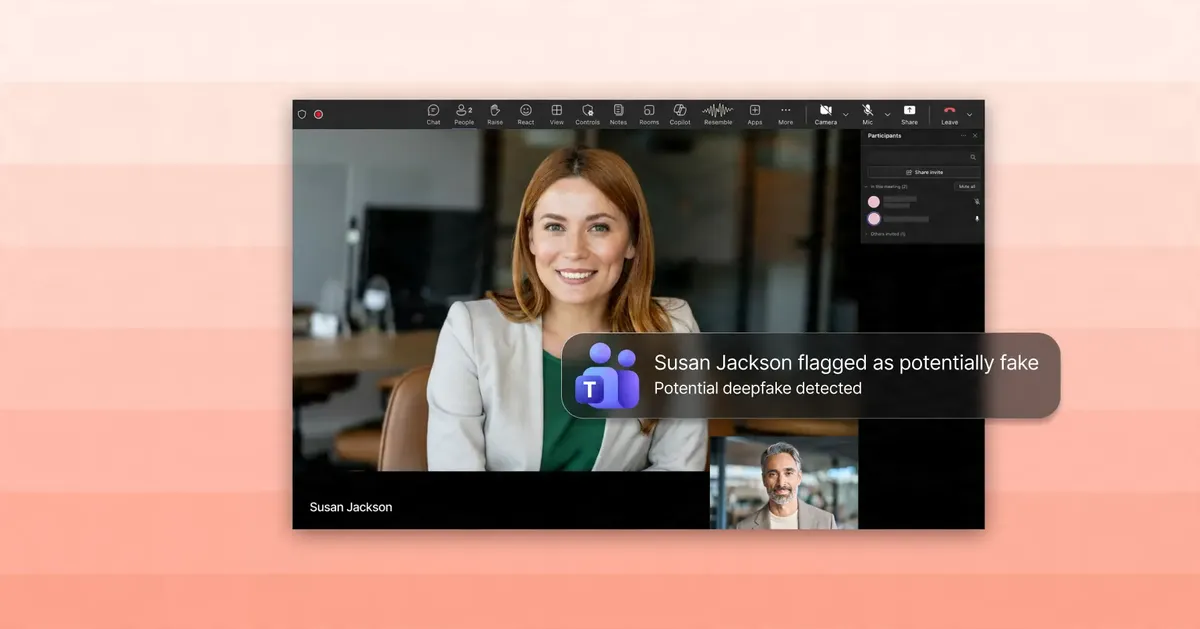
Resemble AI has released a Microsoft Teams integration that analyzes participant audio and video during a call and flags suspected deepfakes while the meeting is still running. According to the company, Resemble Detect works without adding an extra attendee to the call.
- Resemble Detect analyzes participant audio and video in Microsoft Teams meetings in real time.
- It appears as a pinned Teams app, and no separate meeting bot is required, according to Resemble AI.
- It can flag when the name on screen does not match the enrolled face and voice of the person on camera.
- Admins control deployment through the Resemble dashboard and Teams admin controls.
- Only audio and video of participants flagged as suspicious are kept, according to the company.
Detection inside the meeting
Resemble AI says that seeing and hearing someone on a video call is no longer enough to trust who they are. The company argues that attackers can now use AI-generated voice and video to impersonate executives, candidates, vendors, customers and partners in real time.
Resemble Detect is designed to address that risk directly in Microsoft Teams. During a meeting, the tool analyzes participant audio and video streams for signs of synthetic or manipulated media. According to Resemble AI, the detection results can identify whether a participant's audio or video appears real or fake.
The tool appears inside Teams as a pinned app experience for enabled users. Resemble AI says no separate meeting bot is required, although an organization that prefers a visible bot can add one at any time.
Identity matching and alerts
Beyond detecting synthetic media, Resemble Detect can match identities across calls. According to the company, it recognizes people who have been enrolled by face and voice, and it raises a flag when the name shown on screen does not match the person on camera.
When suspicious media is detected, users can receive alerts through multiple Teams surfaces. Resemble AI says this makes high-risk detections hard to miss, both during and after the meeting.
The company lists several scenarios where deepfake risk is moving into everyday business workflows:
- Executive impersonation and payment fraud
- Fake candidates and interview fraud
- Identity swaps between interview rounds
- Vendor, partner and customer impersonation
- Sensitive meetings with external participants
Admin controls and privacy
IT and security administrators can manage deployment and rules through the Resemble dashboard and Microsoft Teams admin controls. Resemble AI says this supports targeted rollouts for teams such as security, finance, HR, executive staff, procurement and customer-facing teams.
On privacy, the company describes an architecture in which only the audio and video of participants flagged as suspicious are kept, so that a security team can review them. According to Resemble AI, everyone else's data is discarded.
What it means for organizations
For companies that hold important conversations on Teams, the release moves deepfake checks into the tool where those conversations already take place, rather than relying on a separate service or an extra participant in the call. The targeted deployment options suggest the tool is aimed at groups with higher exposure to impersonation, such as finance and HR.
The source does not provide pricing, availability dates or accuracy figures, so how well the detection performs in practice is not stated. Interested organizations can contact Resemble AI for more information.
Resemble AI: Resemble AI for Microsoft Teams