Vercel AI Gateway Logs Now Group Requests Into Sessions to Show Cache Routing
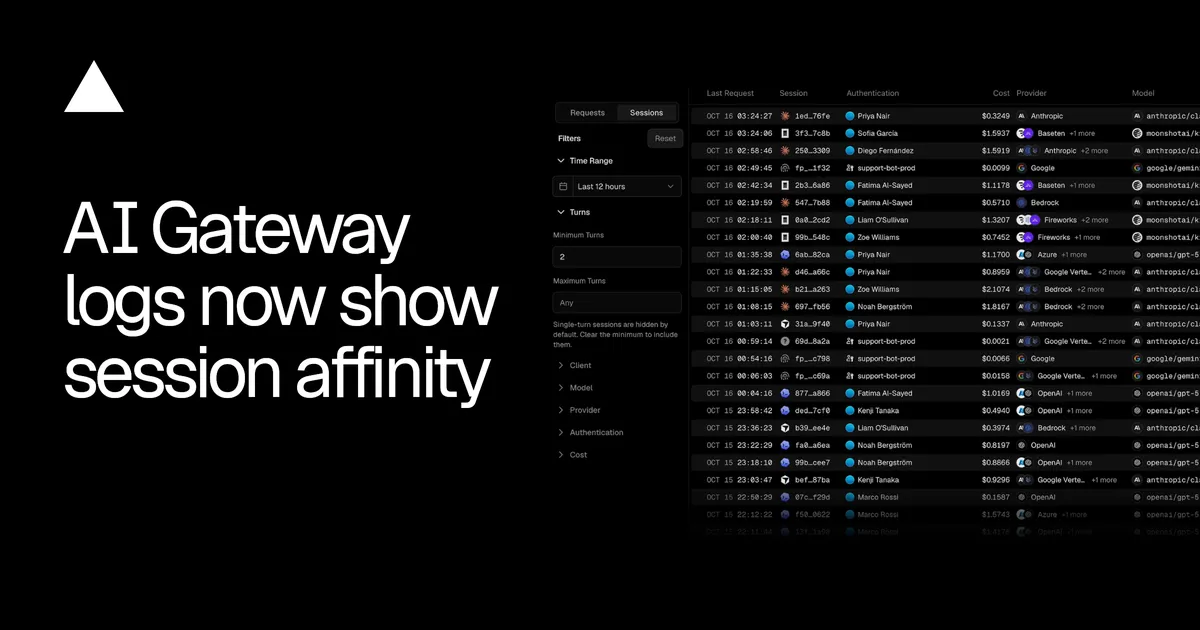
Vercel has added a Sessions view to its AI Gateway logs, grouping requests into sessions and showing how session affinity routed each one. The view reports cache hit rate, cost, models and providers for coding agents and apps such as Claude Code, Codex and Cursor.
- AI Gateway logs now include a Sessions view that groups requests and shows how session affinity routed them.
- Each row shows the client (such as Claude Code, Codex or Cursor), cost, models, providers and cache usage.
- Session affinity sends each turn to the provider that served the previous one, so more of the prompt is read from cache.
- Session affinity runs by default on text and chat requests; a custom sessionId or x-session-id header can group requests manually.
- Requests without a session identifier are grouped by a fingerprint of the conversation's opening.
What the Sessions view shows
According to Vercel, each row in the new view identifies the coding agent or app that ran the session, for example Claude Code, Codex, or Cursor. Alongside it, the row lists the session's cost, the models and providers used, and how much of its input was cached across every turn.
Opening a single session reveals its cache hit rate, duration, and path. The path lists each turn with its model and timing, and names the provider serving the session along with any earlier ones. Vercel says users can also inspect individual sessions for more detailed information on the requests and metrics.
Why session affinity matters for caching
Session affinity is the routing behavior the view is built to expose. Vercel describes it as sending each turn to the provider that served the one before it, so that the provider already has most of the prompt in cache. A session that stays on one provider reads more of each prompt from cache, according to the company.
The new logs make that effect visible. Developers can compare cache hit rates between sessions and see whether a session moved between providers, which is listed in the path view.
Filtering and how sessions are identified
Sessions can be filtered by:
- turns
- client
- model
- provider
- authentication
- cost
Single-turn sessions are hidden by default until the minimum turns filter is cleared.
Session affinity runs by default on text and chat requests. Teams that want to define their own grouping can send the same sessionId in providerOptions.gateway, or the same x-session-id header, on every request in a conversation. Requests that carry neither are grouped by a fingerprint of the conversation's opening and appear as fingerprinted sessions.
What it means for users
For teams that route coding agents and chat apps through AI Gateway, the Sessions view puts cost, provider choice and cache behavior in one place, at the level of a whole conversation rather than individual requests. Vercel points to its session affinity documentation for further detail on how AI Gateway identifies sessions.
Vercel: AI Gateway logs now show session affinity