CodeRabbit Verify brings agentic application testing to public beta
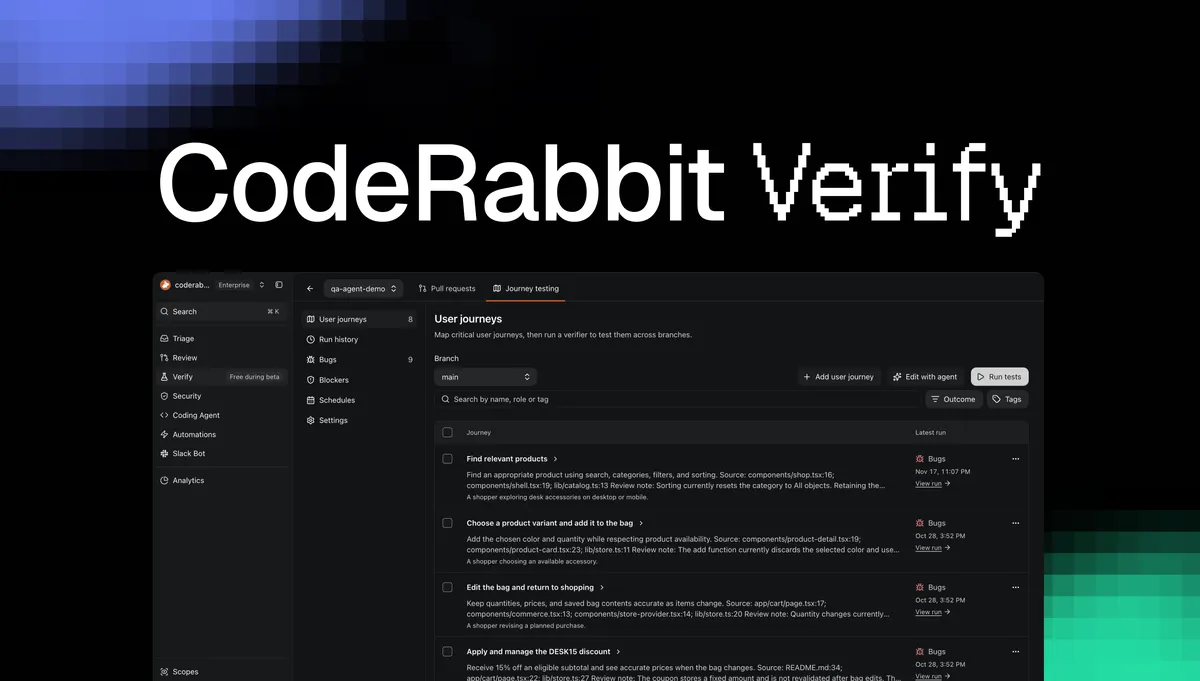
CodeRabbit Verify is now in public beta, giving development teams an agent-led way to test running applications, validate changes in pull requests and detect broken user workflows. Findings can be sent to CodeRabbit Agent or exported to another coding agent for repair.
- CodeRabbit Verify is now in public beta.
- It tests running applications and pull request changes.
- Teams can create reusable regression journeys in plain English.
- Recordings, screenshots and logs support failure investigation.
- Beta PR runs, journey runs and CodeRabbit Agent fixes are free.
Testing beyond the code review
CodeRabbit says Verify is designed for a problem created by the growing volume of code produced by coding agents: manually deploying every change, running through affected workflows and reporting bugs back to an agent is becoming impractical. The service tests whether an application behaves as intended when users interact with it, including whether new changes break existing workflows or expose gaps in unit tests.
For each pull request, Verify builds test scenarios from the commits, relevant source code, user-provided tests and documentation. CodeRabbit’s review context can also inform the testing plan. Expected results come from intended behavior, documentation and existing test expectations, rather than from the new implementation itself. Teams can inspect and refine scenarios before running them.
Results appear directly in the pull request, with links to evidence and recordings. As additional commits arrive, Verify can update the scenario plan and rerun checks that need fresh validation, while keeping earlier results associated with the commit they tested.
User journeys provide reusable regression coverage
Verify can inspect a repository and propose user journeys in plain English. Each journey describes the user, the goal, the steps and the outcomes that must remain true. Teams can discuss and revise the proposals with the agent before approving them as reusable regression tests.
Approved journeys can be edited, run on demand, grouped with tags or scheduled against a branch and test environment. This lets teams check workflows such as checkout or account creation, including functionality that a particular pull request does not appear to affect. For scheduled runs, Verify can automatically create issues in a connected Jira or Linear tracker for new bugs and testing blockers. A later run that verifies a fix can close the finding and update its linked issue.
When a test fails, developers can watch a live browser view and inspect retained recordings, screenshots and logs. Verify also separates an application bug from a limitation such as an application that could not start or a required check that could not be completed.
Sandbox setup and beta access
CodeRabbit Agent prepares the testing environment by inspecting project requirements, installing dependencies, configuring supporting services or emulators, starting the application and checking that it is ready. Testing runs in CodeRabbit’s sandbox, away from the production environment. The service saves setup and startup instructions and a snapshot of the prepared environment so later runs can reuse the preparation.
During the public beta, Verify PR test runs, full-repository journey runs and fixes with CodeRabbit Agent are free, according to CodeRabbit. Developers can start by commenting @coderabbitai verify on a pull request. If the repository is not configured, CodeRabbit’s reply provides a setup link for preparing the test environment. Teams can also generate journeys from their codebase and run them on demand or on a schedule.
The launch positions Verify as a way to reduce manual QA work while retaining evidence that developers and coding agents can use to investigate and repair functional bugs. CodeRabbit says the aim is to help teams move agent-generated changes through testing faster without sacrificing application quality.